The two ways of recording a day
attrect offers two ways of recording time. You choose between them in the account menu — top right, under your name — and the choice holds until you change it.
Both write the same thing. An entry always consists of a start, the hours worked, and the time during which the activity lay idle. The two ways differ only in which of those you type and which the application works out. That is why you can switch at any time: a week recorded in the form reads exactly the same on the timeline, and the other way round.
In the form
The default. Under each day sits a row where you enter project, activity, start, hours and interruptions side by side and save with Enter.
| Field | What goes in it |
|---|---|
| Start | When you began, 09:00 |
| Hours | How long you actually worked on the thing |
| Interruptions | How long it lay idle during that time |
Beside them stands the end that follows from the three. It is not stored but worked out while you type, so you can see straight away whether the times fit the day.
Notations
Times can be written as a decimal or as a duration, whichever comes easier:
| Input | Meaning |
|---|---|
1.25 | one hour fifteen |
1:15 | one hour fifteen |
75 | in the interruption field: 75 minutes |
The interruption field has one extra rule, which rarely comes up and is therefore stated here: a whole number below the recording increment counts as hours. At the usual increment of 15 minutes, 45 is three quarters of an hour but 2 is two hours — nobody records a two-minute interruption, and the arrow keys could not even produce such a value. The increment comes from the customer; at an increment of 30, 20 is twenty hours, and twenty minutes is written 0:20.
Arrow keys
In the time fields, ↑ and ↓ jump to the next multiple of the recording increment. Hold Shift and they move by one whole hour, keeping the minutes where they are: 08:45 becomes 09:45, not 09:00. On a five-minute increment that would otherwise be twelve presses per hour.
Values off the grid stay typeable regardless — a value beside the grid is a fact, not a mistake.
Billability
Whether work can be charged for is not yours to decide while recording it: it follows from the project and the activity, and both have to allow it. An internal activity stays internal even on a customer's project — and the other way round. This is maintained in the master data, not on the entry.
Entries that come out as not billable carry a badge saying so in the list. Anybody holding the lead role can turn the rule around for a single entry; if that entry later moves to another project or activity, the rule applies again.
Goodwill is a different thing: hours that would be billable and that you deliberately do not charge for. They stay among the recorded hours and are reported separately.
On the timeline
Here you drag instead of typing. Each day is a track, and an activity is a span on it: from when to when you were at it.
- Dragging on the dashed strip creates a new span.
- Shift+dragging creates a break instead — recorded straight away, without a form, because a break has neither project nor activity. A comment follows on a double click.
- The edges of a span change its start or its end.
- The middle moves it as a whole.
- Double-clicking a span opens its form — for the project, activity, location or comment, which the track has nowhere to show. Delete lives there too, with a confirmation; the timeline is the whole list of the day, and there is no row of buttons beside it any more.
- Keyboard: with a span focused,
←and→move it as a whole and keep its length.Shift+arrow drags its end only,Alt+arrow its start only, so either makes it longer or shorter. Both step by the recording increment.EnterorSpaceopens the form — the way to delete without a mouse.
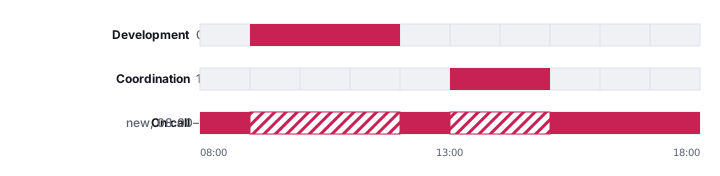
The span itself says what the day worked out: the project, the start and the end, and — where there is one — the interruption taken off, as in Development 09:00–12:00 −00:30. The bar is the gross stretch, and the figure beside it says how much of it did not go on the project.
The track shows 07:00 to 19:00 by default. Drag a span past either end and the range grows with it — there is nothing to configure, and an early shift or a long evening stays recordable.
It stops at midnight at both ends: the track is one day. An activity that reaches past midnight is recorded in the form — there you type the times, and they mean exactly that.
When you let go of an activity, the familiar form opens with the times already filled in — the timeline says when, and what is still the form's question. A break leaves nothing to ask; it stands on the day right away.
The application works the interruption out
On the timeline you do not enter interruptions. Whatever lies inside a span counts as that span's interruption.
Drag a half-hour stand-up into the middle of a three-hour block of development and the block is left with 2.5 hours — the half hour stands with the stand-up:

This works backwards too: delete the stand-up and the block has its three hours again.
And you can add an enclosing activity afterwards. Drag a span across the whole day and it takes everything already recorded as its interruption, keeping the rest — the convenient way to say "the rest of the day went on this project":
When an edge jumps
Two spans may sit inside one another — that is what attrect reads the interruption from. What does not work is two spans that merely cross: neither contains the other, and then nothing says which of the two gave up the time.
Dragging never produces that. The edge jumps to the nearest reading that is unambiguous — either outwards, until your span encloses the other entirely, or inwards, until it ends where the other begins. Which of the two is decided by the shorter distance.
Switching
Switching is possible at any time, in both directions, and it changes nothing about what is already recorded.
One thing is worth knowing: as soon as you type an entry's hours by hand, the application stops maintaining that entry's interruption. This is deliberate — a number you set yourself should not wander again behind your back. The entry then stays as it is, even when the day changes around it.
Recommendation
Stay with one way of recording rather than switching back and forth. Both are complete and produce the same data — but a day half dragged and half typed behaves less predictably the next time you change it, because the application only keeps the dragged entries up to date.